“Tiva Testimonials Slider For Wordpress” Documentation by “TivaTheme” v1.0
Tiva Testimonials Slider For Wordpress
Created: 20/05/2016
By: TivaTheme
Email: tivatheme@cloodo.com
Thank you for purchasing my product. If you have any questions that are beyond the scope of this help file, please feel free to email via my user page contact form here. Thanks so much!
Table of Contents
A) Overview - top
Tiva Testimonials Slider For Wordpress is plugin which help you to display all testimonials on slider.

With many styles and options, you can customize your testimonials slider easily.

You can put testimonials slider everywhere in your website via widget or shortcode.

Why choose Tiva Testimonials Slider For Wordpress ?
- Display your testimonials friendly on slider.
- Very easy to integrate into your website.
- Many styles to choose.
- Many options to customize.
- Fully responsive.
- ...
B) System Requirements - top
This product is compatible with :
- WordPress : > 3.5
Compatible Browsers :
- IE8
- IE9
- IE10
- IE11
- Firefox
- Safari
- Opera
- Chrome
- Edge
C) Installation - top
Step 1: Download the plugin to your local machine as a zip file package.
Step 2: From the backend of your WordPress site, select Plugins » Installed Plugins, then click the Add New button » click Upload Plugin and select the plugin package on your local machine. Then click the Install Now button to install module.
Step 3: After install plugin successful, click Activate Plugin to enable it.

D) Usage - top
In admin site, click menu Tiva Testimonials to manage testimonials (Add new, Edit, Delete)

There are 2 ways to use this plugin :
- Widget
- Shortcode
- Widget : To use it as widget, in admin site, select Appearance » Widgets to go to widgets management page. Then drag widget Tiva Testimonials Slider into sidebar you want to display. In the configuration area of widget, enter data for fields :
- Title : Title of widget.
- Items : Number of testimonials to display per step.
- Layout : Layout of slider. There are 7 layouts : 1 -> 7.
- Auto play slider : Auto play slider or not.
- Show navigation : Show slider navigation or not.
- Shape of image : shape of image (circle or square).
- Width of image border : width of image border via px.
- Effect : effect of slider transition.
- Background of item : background of testimonial item. Leave it blank if not use.
- Color of name : color of testimonial's name. Leave it blank to return default value: #757575.
- Color of job : color of testimonial's job. Leave it blank to return default value: #757575.
- Color of rating : color of testimonial's rating. Leave it blank to return default value: #bebebe.
- Color of content : color of testimonial's content. Leave it blank to return default value: #818181.
- Color of border image : color of testimonial's border image. Leave it blank to return default value: #ffffff.
- Background of tooltip : background of testimonial's tooltip content. Leave it blank to return default value: #ffffff.
- Color of tooltip border : color of testimonial's border tooltip content. Leave it blank to return default value: #cccccc.
- Color of navigation : color of slider's navigation. Leave it blank to return default value: #d6d6d6.
- Color of current navigation : color of current slider's navigation. Leave it blank to return default value: #869791.

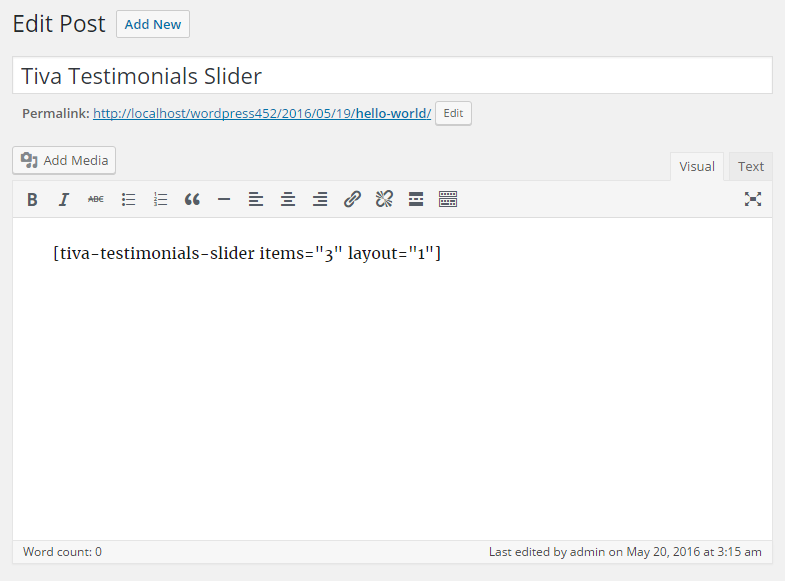
- Shortcode : To use it as shortcode, in admin site, go to area to add shortcode (For example : post). In text editor, enter shortcode :
[tiva-testimonials-slider items="3" layout="1"].
There are many option params to customize the slider :
- items : Number of testimonials to display per step. Default value: 3.
- layout : Layout of slider (1/2/3/4/5/6/7). Default value: 1.
- autoplay : Auto play slider or not (true/false). Default value: true.
- nav : Show slider navigation or not (true/false). Default value: true.
- image : shape of image (circle/square). Default value: circle.
- width_border : width of image border via px (1/2/3/4/5/6/7/8/9/10). Default value: 5.
- effect : effect of slider transition (slide/fadeOut). Default value: slide.
- color_background : background of testimonial item. Use it if want to set background for item.
- color_name : color of testimonial's name. Default value: #757575.
- color_job : color of testimonial's job. Default value: #757575.
- color_rating : color of testimonial's rating. Default value: #bebebe.
- color_content : color of testimonial's content. Default value: #818181.
- color_border : color of testimonial's border image. Leave it blank to return default value: #ffffff.
- color_tooltip : background of testimonial's tooltip content. Leave it blank to return default value: #ffffff.
- color_tooltip_border : color of testimonial's border tooltip content. Leave it blank to return default value: #cccccc.
- color_nav : color of slider's navigation. Leave it blank to return default value: #d6d6d6.
- color_nav_current : color of current slider's navigation. Leave it blank to return default value: #869791.
Once again, thank you so much for purchasing this product. As I said at the beginning, I'd be glad to help you if you have any questions relating to this product. No guarantees, but I'll do my best to assist. If you have a more general question relating to the product on CodeCanyon, you might consider visiting the forums and asking your question in the "Item Discussion" section.
TivaTheme